# Pica AI

# 什麼是 Pica AI

[![image.png](https://genai.thu.edu.tw/uploads/images/gallery/2024-12/scaled-1680-/OErimage.png)](https://genai.thu.edu.tw/uploads/images/gallery/2024-12/OErimage.png)
#### 簡介

[<span lang="IT" style="font-size: 11.0pt; font-family: 'PingFang TC Regular',serif; mso-fareast-font-family: 'Arial Unicode MS'; mso-bidi-font-family: 'Arial Unicode MS'; color: black; mso-style-textoutline-type: none; mso-style-textoutline-outlinestyle-dpiwidth: 0pt; mso-style-textoutline-outlinestyle-linecap: flat; mso-style-textoutline-outlinestyle-join: bevel; mso-style-textoutline-outlinestyle-pctmiterlimit: 0%; mso-style-textoutline-outlinestyle-dash: solid; mso-style-textoutline-outlinestyle-align: center; mso-style-textoutline-outlinestyle-compound: simple; mso-ansi-language: IT; mso-fareast-language: ZH-TW; mso-bidi-language: AR-SA;">Pica.ai </span>](https://www.pica-ai.com/)<span style="font-size: 11.0pt; font-family: 'PingFang TC Regular',serif; mso-fareast-font-family: 'PingFang TC Regular'; mso-bidi-font-family: 'Arial Unicode MS'; color: black; mso-style-textoutline-type: none; mso-style-textoutline-outlinestyle-dpiwidth: 0pt; mso-style-textoutline-outlinestyle-linecap: flat; mso-style-textoutline-outlinestyle-join: bevel; mso-style-textoutline-outlinestyle-pctmiterlimit: 0%; mso-style-textoutline-outlinestyle-dash: solid; mso-style-textoutline-outlinestyle-align: center; mso-style-textoutline-outlinestyle-compound: simple; mso-ansi-language: ZH-TW; mso-fareast-language: ZH-TW; mso-bidi-language: AR-SA;">是一個革命性的人工智慧平台，旨在幫助開發人員快速、輕鬆地設計應用程式的用戶界面。這個平台引入了 </span><span lang="IT" style="font-size: 11.0pt; font-family: 'PingFang TC Regular',serif; mso-fareast-font-family: 'Arial Unicode MS'; mso-bidi-font-family: 'Arial Unicode MS'; color: black; mso-style-textoutline-type: none; mso-style-textoutline-outlinestyle-dpiwidth: 0pt; mso-style-textoutline-outlinestyle-linecap: flat; mso-style-textoutline-outlinestyle-join: bevel; mso-style-textoutline-outlinestyle-pctmiterlimit: 0%; mso-style-textoutline-outlinestyle-dash: solid; mso-style-textoutline-outlinestyle-align: center; mso-style-textoutline-outlinestyle-compound: simple; mso-ansi-language: IT; mso-fareast-language: ZH-TW; mso-bidi-language: AR-SA;">Pica </span><span style="font-size: 11.0pt; font-family: 'PingFang TC Regular',serif; mso-fareast-font-family: 'PingFang TC Regular'; mso-bidi-font-family: 'Arial Unicode MS'; color: black; mso-style-textoutline-type: none; mso-style-textoutline-outlinestyle-dpiwidth: 0pt; mso-style-textoutline-outlinestyle-linecap: flat; mso-style-textoutline-outlinestyle-join: bevel; mso-style-textoutline-outlinestyle-pctmiterlimit: 0%; mso-style-textoutline-outlinestyle-dash: solid; mso-style-textoutline-outlinestyle-align: center; mso-style-textoutline-outlinestyle-compound: simple; mso-ansi-language: ZH-TW; mso-fareast-language: ZH-TW; mso-bidi-language: AR-SA;">編輯器，一個強大的工具，讓開發人員可以輕鬆地轉換設計概念為實際的程式碼，從而節省寶貴的開發時間。</span>

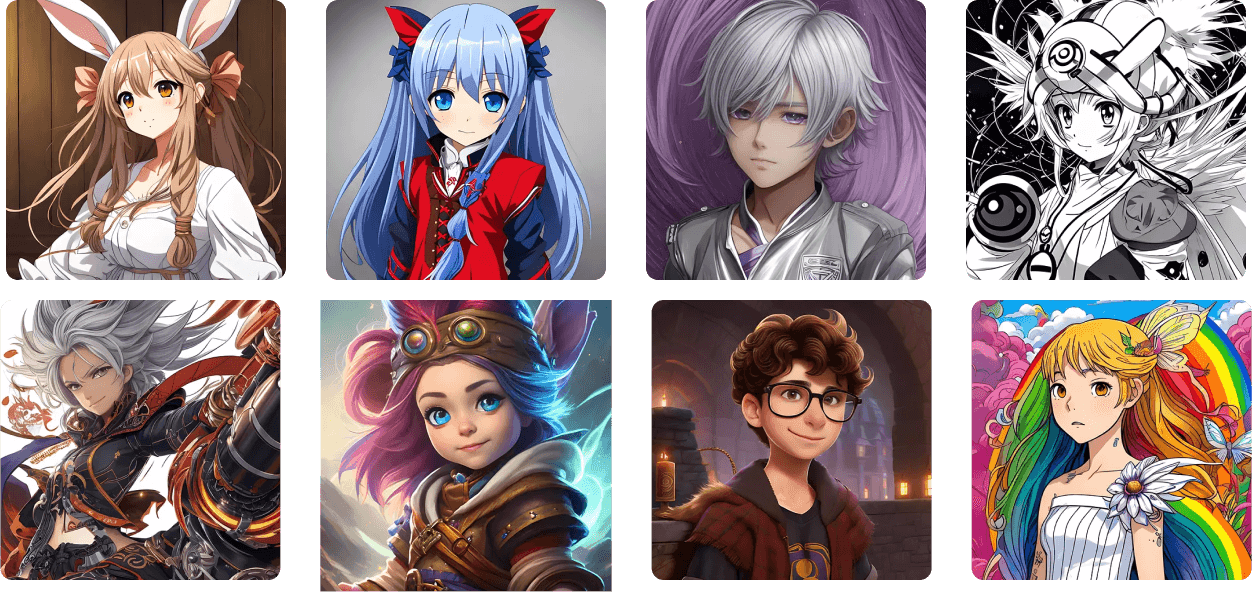
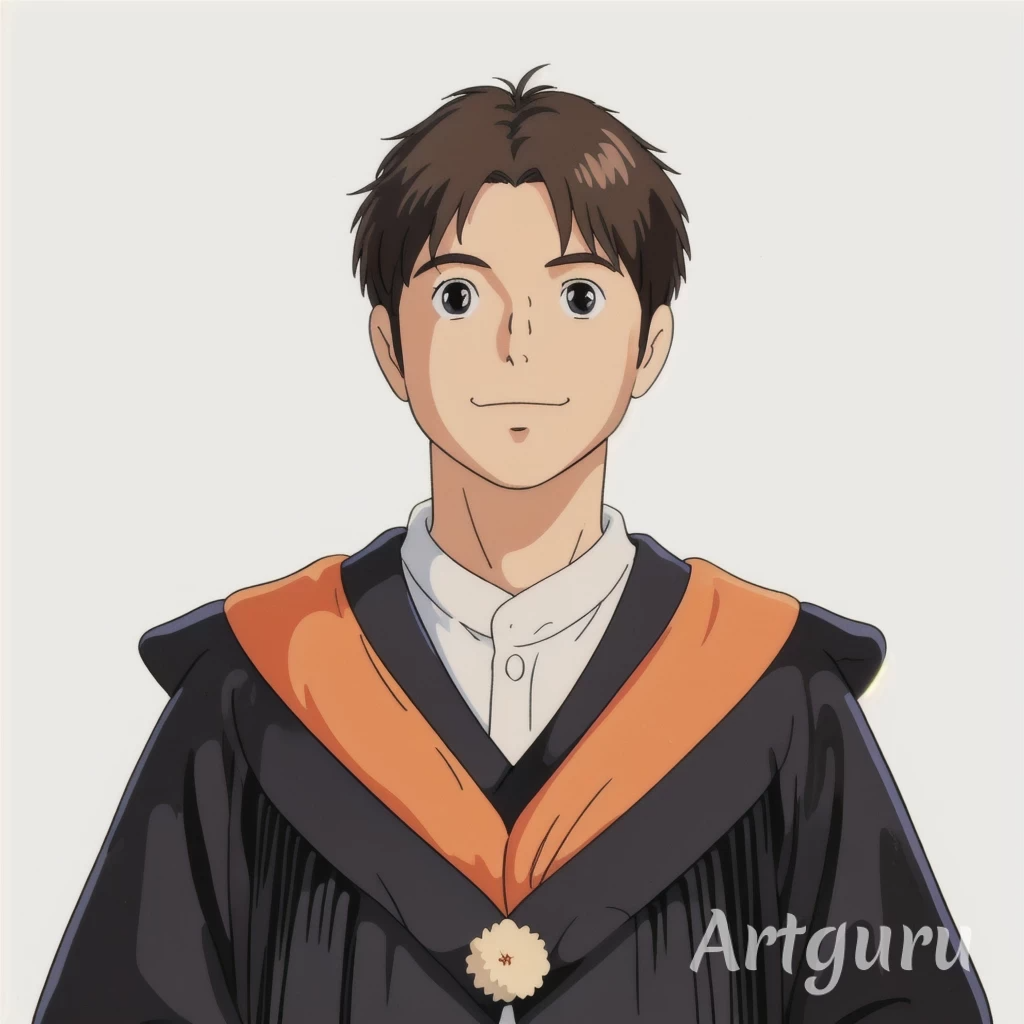
#### <span style="mso-fareast-font-family: 'PingFang TC Regular'; mso-ansi-language: ZH-TW;">作品範例</span>

![image.png](https://genai.thu.edu.tw/uploads/images/gallery/2024-12/scaled-1680-/3PIimage.png)

#### Pica AI的優點

#### **簡單易用**

Pica AI繪圖網站的操作非常簡單易用。你不需要擁有專業的圖像處理知識，只需幾個簡單的步驟，即可輕鬆將真人照片轉換成可愛的Q版卡通風格。

#### **高效快速**

Pica AI繪圖網站憑藉其先進的AI圖像處理技術，能夠在短時間內快速生成Q版卡通照片。你不需要花費大量的時間等待，即可迅速獲得理想的效果。

#### **多樣風格**

Pica AI繪圖網站提供多樣的藝術風格供你選擇，從卡通風格到3D風格，再到動漫風格，你都能找到最適合自己的風格。這讓你可以根據不同的場合和需求，輕鬆變換形象。

#### **無版權限制**

生成的Q版卡通照片通常不受版權限制，你可以自由在各種場合中使用，包括商業用途。這為企業品牌推廣和創意營銷提供了全新的可能性。

#### **免費使用**

Pica AI繪圖網站是一個免費的線上服務，你可以隨時隨地使用。這讓更多的人能夠輕鬆體驗線上照片變Q版卡通風格的樂趣。

# Pica AI 於產業上的應用

<span lang="IT" style="font-size: 11.0pt; font-family: 'PingFang TC Regular',serif; mso-fareast-font-family: 'Arial Unicode MS'; mso-bidi-font-family: 'Arial Unicode MS'; color: black; mso-style-textoutline-type: none; mso-style-textoutline-outlinestyle-dpiwidth: 0pt; mso-style-textoutline-outlinestyle-linecap: flat; mso-style-textoutline-outlinestyle-join: bevel; mso-style-textoutline-outlinestyle-pctmiterlimit: 0%; mso-style-textoutline-outlinestyle-dash: solid; mso-style-textoutline-outlinestyle-align: center; mso-style-textoutline-outlinestyle-compound: simple; mso-ansi-language: IT; mso-fareast-language: ZH-TW; mso-bidi-language: AR-SA;">Pica.ai </span><span style="font-size: 11.0pt; font-family: 'PingFang TC Regular',serif; mso-fareast-font-family: 'PingFang TC Regular'; mso-bidi-font-family: 'Arial Unicode MS'; color: black; mso-style-textoutline-type: none; mso-style-textoutline-outlinestyle-dpiwidth: 0pt; mso-style-textoutline-outlinestyle-linecap: flat; mso-style-textoutline-outlinestyle-join: bevel; mso-style-textoutline-outlinestyle-pctmiterlimit: 0%; mso-style-textoutline-outlinestyle-dash: solid; mso-style-textoutline-outlinestyle-align: center; mso-style-textoutline-outlinestyle-compound: simple; mso-ansi-language: ZH-TW; mso-fareast-language: ZH-TW; mso-bidi-language: AR-SA;">提供了豐富的範例和模板，讓開發人員可以快速開始他們的項目。這些範例和模板不僅可以節省時間，還可以作為學習和參考的資源，幫助開發人員更好地理解平台的使用方式。此外，</span><span lang="IT" style="font-size: 11.0pt; font-family: 'PingFang TC Regular',serif; mso-fareast-font-family: 'Arial Unicode MS'; mso-bidi-font-family: 'Arial Unicode MS'; color: black; mso-style-textoutline-type: none; mso-style-textoutline-outlinestyle-dpiwidth: 0pt; mso-style-textoutline-outlinestyle-linecap: flat; mso-style-textoutline-outlinestyle-join: bevel; mso-style-textoutline-outlinestyle-pctmiterlimit: 0%; mso-style-textoutline-outlinestyle-dash: solid; mso-style-textoutline-outlinestyle-align: center; mso-style-textoutline-outlinestyle-compound: simple; mso-ansi-language: IT; mso-fareast-language: ZH-TW; mso-bidi-language: AR-SA;">Pica.ai </span><span style="font-size: 11.0pt; font-family: 'PingFang TC Regular',serif; mso-fareast-font-family: 'PingFang TC Regular'; mso-bidi-font-family: 'Arial Unicode MS'; color: black; mso-style-textoutline-type: none; mso-style-textoutline-outlinestyle-dpiwidth: 0pt; mso-style-textoutline-outlinestyle-linecap: flat; mso-style-textoutline-outlinestyle-join: bevel; mso-style-textoutline-outlinestyle-pctmiterlimit: 0%; mso-style-textoutline-outlinestyle-dash: solid; mso-style-textoutline-outlinestyle-align: center; mso-style-textoutline-outlinestyle-compound: simple; mso-ansi-language: ZH-TW; mso-fareast-language: ZH-TW; mso-bidi-language: AR-SA;">是一個跨平台的解決方案，支援各種不同的應用程式開發框架和技術。不論是 </span><span lang="EN-US" style="font-size: 11.0pt; font-family: 'PingFang TC Regular',serif; mso-fareast-font-family: 'Arial Unicode MS'; mso-bidi-font-family: 'Arial Unicode MS'; color: black; mso-style-textoutline-type: none; mso-style-textoutline-outlinestyle-dpiwidth: 0pt; mso-style-textoutline-outlinestyle-linecap: flat; mso-style-textoutline-outlinestyle-join: bevel; mso-style-textoutline-outlinestyle-pctmiterlimit: 0%; mso-style-textoutline-outlinestyle-dash: solid; mso-style-textoutline-outlinestyle-align: center; mso-style-textoutline-outlinestyle-compound: simple; mso-ansi-language: EN-US; mso-fareast-language: ZH-TW; mso-bidi-language: AR-SA;">Web </span><span style="font-size: 11.0pt; font-family: 'PingFang TC Regular',serif; mso-fareast-font-family: 'PingFang TC Regular'; mso-bidi-font-family: 'Arial Unicode MS'; color: black; mso-style-textoutline-type: none; mso-style-textoutline-outlinestyle-dpiwidth: 0pt; mso-style-textoutline-outlinestyle-linecap: flat; mso-style-textoutline-outlinestyle-join: bevel; mso-style-textoutline-outlinestyle-pctmiterlimit: 0%; mso-style-textoutline-outlinestyle-dash: solid; mso-style-textoutline-outlinestyle-align: center; mso-style-textoutline-outlinestyle-compound: simple; mso-ansi-language: ZH-TW; mso-fareast-language: ZH-TW; mso-bidi-language: AR-SA;">應用程式、移動應用程式還是其他類型的應用程式，開發人員都可以利用 </span><span lang="IT" style="font-size: 11.0pt; font-family: 'PingFang TC Regular',serif; mso-fareast-font-family: 'Arial Unicode MS'; mso-bidi-font-family: 'Arial Unicode MS'; color: black; mso-style-textoutline-type: none; mso-style-textoutline-outlinestyle-dpiwidth: 0pt; mso-style-textoutline-outlinestyle-linecap: flat; mso-style-textoutline-outlinestyle-join: bevel; mso-style-textoutline-outlinestyle-pctmiterlimit: 0%; mso-style-textoutline-outlinestyle-dash: solid; mso-style-textoutline-outlinestyle-align: center; mso-style-textoutline-outlinestyle-compound: simple; mso-ansi-language: IT; mso-fareast-language: ZH-TW; mso-bidi-language: AR-SA;">Pica </span><span style="font-size: 11.0pt; font-family: 'PingFang TC Regular',serif; mso-fareast-font-family: 'PingFang TC Regular'; mso-bidi-font-family: 'Arial Unicode MS'; color: black; mso-style-textoutline-type: none; mso-style-textoutline-outlinestyle-dpiwidth: 0pt; mso-style-textoutline-outlinestyle-linecap: flat; mso-style-textoutline-outlinestyle-join: bevel; mso-style-textoutline-outlinestyle-pctmiterlimit: 0%; mso-style-textoutline-outlinestyle-dash: solid; mso-style-textoutline-outlinestyle-align: center; mso-style-textoutline-outlinestyle-compound: simple; mso-ansi-language: ZH-TW; mso-fareast-language: ZH-TW; mso-bidi-language: AR-SA;">編輯器來快速設計並生成高質量的用戶界面。</span>

# 如何使用Pica AI (人物卡通化)

![image.png](https://genai.thu.edu.tw/uploads/images/gallery/2024-12/scaled-1680-/z1kimage.png)

Pica AI 只需簡單幾步即可實現真人照片變Q版卡通人物，只需簡單幾步即可實現。

#### Step 1. 打開 Pica AI線上網站

首先，請前往[Pica AI線上網站](https://www.pica-ai.com/tw/ai-art-generator/)，你不需要下載或安裝任何軟體，任何有網路鏈接的設備都可以輕鬆訪問。

<figure class="wp-block-image size-full" id="bkmrk--2">![打開 Pica AI線上網站](http://www.pica-ai.com/resource-tw/wp-content/uploads/sites/8/sites/20/2023/07/upload-selfie.png)</figure>#### Step 2. 上傳你的真人照片

在網站上，你可以輕鬆上傳你的真人照片。 Pica AI將立即對圖像進行處理，準備進行卡通風格的轉換。

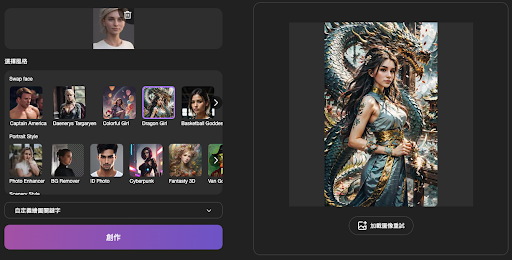
#### Step 3. 選擇卡通風格

<figure class="wp-block-image size-full" id="bkmrk--3">![上傳你的真人照片](http://www.pica-ai.com/resource-tw/wp-content/uploads/sites/8/sites/20/2023/07/choose-photo-style.png)</figure>![324352437-1228555081414408-70100227385740578-n.jpg](https://genai.thu.edu.tw/uploads/images/gallery/2025-05/scaled-1680-/dkj324352437-1228555081414408-70100227385740578-n.jpg)

接下來，你可以從Pica AI提供的多種藝術風格中進行選擇，比如卡通、3D、動漫等。此外，你還可以嘗試其他風格，變身成各種角色，如超級英雄、商務精英、騎士、貓女等等。

#### Step 4. 點擊創作按鈕，等待Pica AI線上照片變Q版卡通人物

完成藝術風格的選擇後，只需點擊「創作」按鈕，Pica AI將開始進行線上照片轉Q版卡通人物的處理。在等待的過程中，你可以放鬆心情，準備欣賞你的創作。

![JackWu.png](https://genai.thu.edu.tw/uploads/images/gallery/2025-05/scaled-1680-/jackwu.png)

<figure class="wp-block-image size-full" id="bkmrk--6">![Pica AI線上照片變Q版卡通人物](http://www.pica-ai.com/resource-tw/wp-content/uploads/sites/8/sites/20/2023/07/photo-to-anime.png)</figure>#### Step 5. 查看生成的Q版卡通照片，保存或重新生成

處理完成後，你可以立即查看生成的Q版卡通人物照片。如果對結果感到滿意，你可以保存使用，或者如果想要嘗試其他風格，也可以重新生成直到滿意為止。 Pica AI繪圖網站讓你擁有無限的可能性，讓你的照片輕鬆變成各種可愛的卡通風格，隨時與朋友分享歡樂！

# 如何使用Pica AI (換臉)

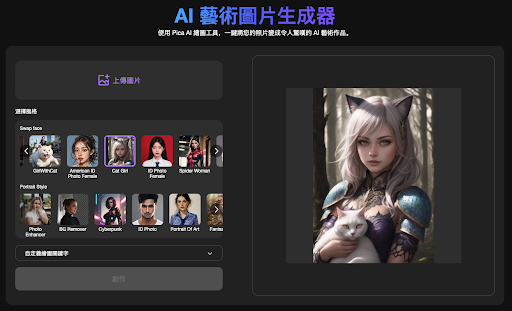
#### Step 1. 打開 Pica AI線上網站

首先，請前往[Pica AI線上網站](https://www.pica-ai.com/tw/ai-art-generator/)，你不需要下載或安裝任何軟體，任何有網路鏈接的設備都可以輕鬆訪問。

[![image.png](https://genai.thu.edu.tw/uploads/images/gallery/2024-12/scaled-1680-/Z7Nimage.png)](https://genai.thu.edu.tw/uploads/images/gallery/2024-12/Z7Nimage.png)

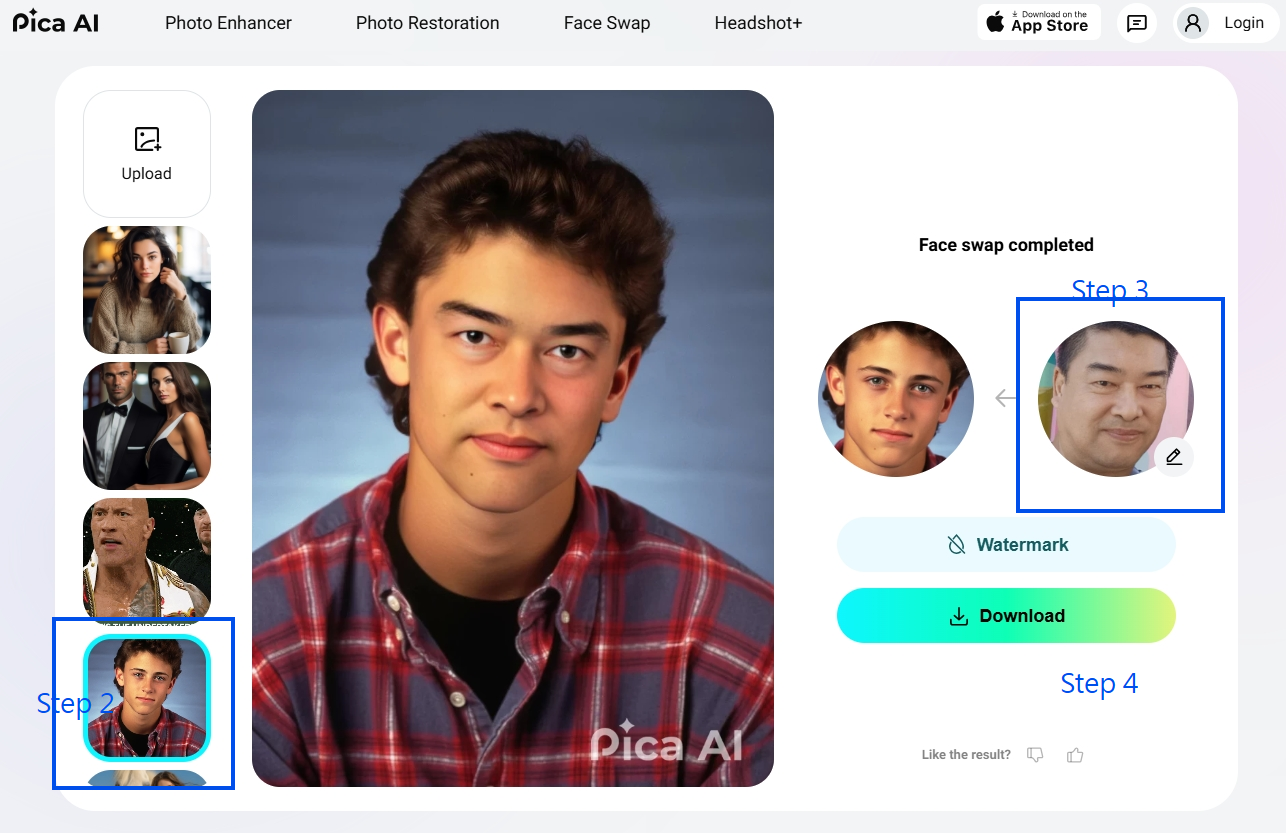
#### Step 2. 選擇範本圖片

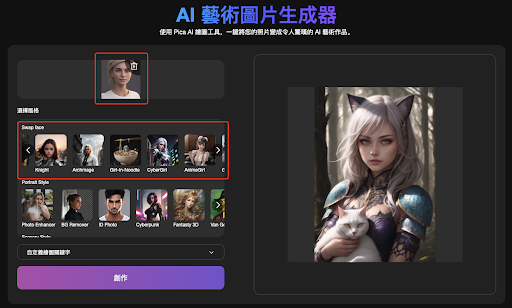
#### Step 3. 上傳你的真人照片

在網站上，你可以輕鬆上傳你的真人照片。 Pica AI將立即對圖像進行處理，準備進行卡通風格的轉換。

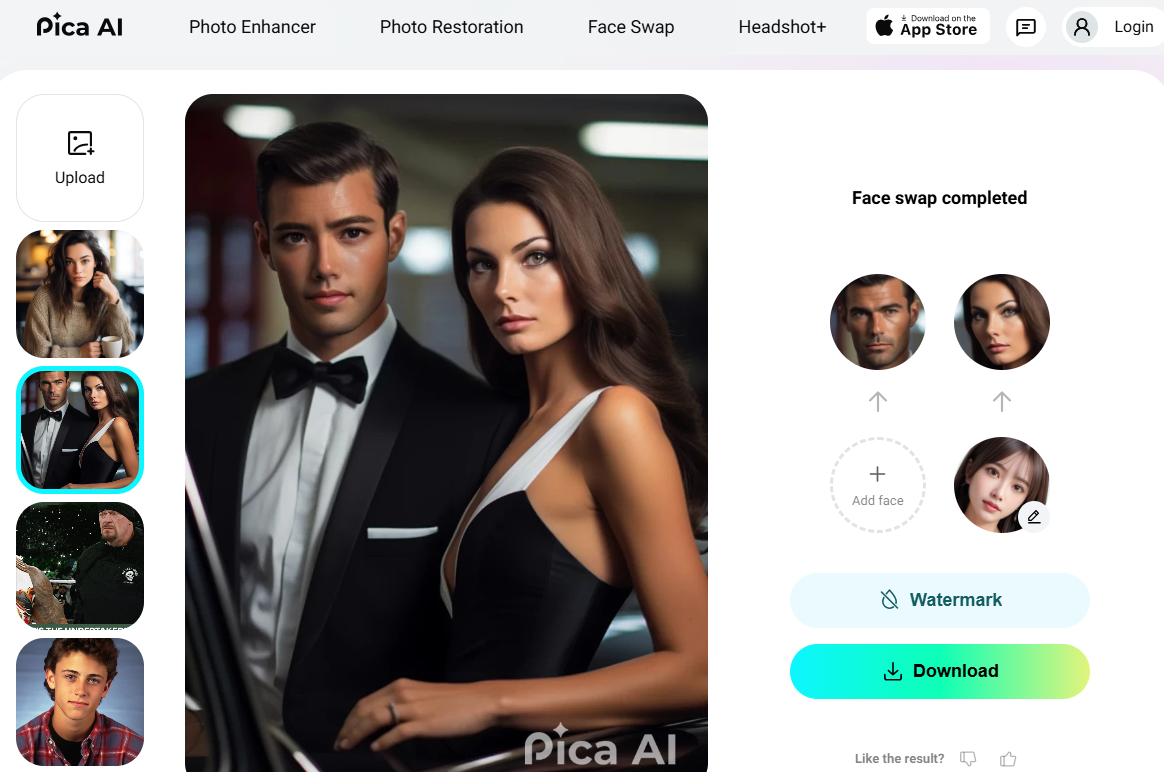
#### Step 4. 開始換臉並下載圖片

處理完成後，你可以立即查看生成的新臉孔照片。如果對結果感到滿意，你可以保存使用，隨時與朋友分享歡樂！